SQL Database
Introduction
Problem:
A fictious food company, HealthySnacks, needed to find a way to better organize and retrieve information about its many products, inventory levels, orders, and other business data.
Context:
I created the database for HealthySnacks on my own, before enrolling in CareerFoundry's Data Analytics Program. At that point in time, I had already studied SQL and had just taken an 8-hour course on database design and normalization. The purpose of this project was to enhance my SQL skills by understanding database design and normalization. This project also gave me to opportunity to apply my domain skills in food manufacturing to data analytics.
Goal:
My goal was to enable the creation of a database that would optimize data storage and retrievel by being normalized and encouraging data integrity. This meant that the design of the database was designed according to database design conventions to make retrieval of information efficient and able to occur in the fewest number of steps, discourage the input of erroneous values, and maintain the proper relationships between tables of data.

Tools:
- MySQL
Data (fictional):
- Product Categories
- Products
- Customers
- Orders
- Ordered Items
- Payments
- Manufacture Site
Process
Process Steps:
| Step | Skills | Purpose |
|---|---|---|
| 1. Database design | Obtained business requirements; carried out conceptional design, logical design, and physical design; ensured database was normalized and had entity, referential, and domain integrity for optimal performance. | Took necessary steps to construct optimized database. |
| 2. Construction & implementation | Constructed tables, filled tables with data, added appropriate constraints, established relationships between tables and added constraints to maintain these relationships. | Created structure for database storage, retrievel, and maintenance. |
| 3. Enhanced database automation | Created various triggers to update inventory levels and prevent MOQs from not being met. | Increased effiency and automation and minimized intervention of database administrators and staff. |
| 4. Created views, stored procedures, & other queries | Created views and stored procedures and demonstrated use of JOINs, aggregate functions, GROUP BY, HAVING, ORDER BY, and WHERE clauses. | Demonstrate some of my other SQL skills and give staff some helpful stored queries for easier, more intuitive data retrieval. |
Database Design:
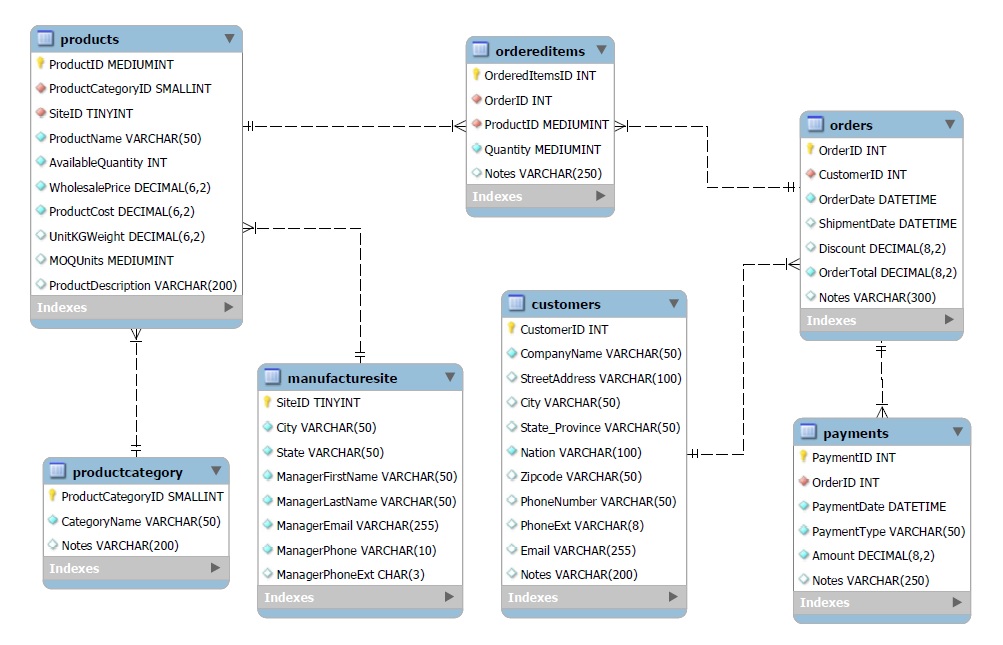
In the image below, each square represents a table in the database. Primary keys have a yellow icon next to them, while foreign keys, which serve as connections to other tables via their primary keys, have a red icon next to them. This database adheres to design conventions, a few which are listed below:
- Primary key/foreign key pairs are on correct one-to-many relationship sides.
- Attribute types or columns only relate to their entity type (table category), other than a foreign key that connects two tables.
- Data types are set to sizes that are just the right size to reduce storage and enhance speed.
- Primary surrogate keys were created for each table to protect entity integrity and ensure each row was unique. This ensured no duplicate records existed in the database and optimized data retrieval efficiency.
- Data types were set to ensure acceptable values were entered into the table, ensuring domain integrity.
Referential Integrity:
A continuation of database design, referential integrity ensures that the correct relationships exist between tables, such as connections between primary and foreign keys, and that those relationships are maintained. The code below was used to create the payments table. Payments is related to the orders table referenced in the code here. In fact, orders is called the parent table, while payments is the child table, which is demonstrated with the code "FOREIGN KEY(OrderID) REFERENCES Orders (OrderID)." This means that payments cannot exist without orders. There is a foreign key constraint in the code below using "ON DELETE RESTRICT," which means that deleting an order in the orders table that is connected to a payment in the payments table will not be allowed, preventing something called orphan records. A payment that is associated with an order would have to be deleted first before the order could be deleted. There are other possible foreign key constraints, such as ON UPDATE CASCADE (just one other example) that would update a record in the child table when a record in the parent table with the associated primary key is updated.
CREATE TABLE Payments
(
	PaymentID INT UNSIGNED NOT NULL PRIMARY KEY AUTO_INCREMENT,
	OrderID INT UNSIGNED NOT NULL,
	PaymentDate DATETIME NOT NULL,
	PaymentType VARCHAR(50) NOT NULL,
	Amount DECIMAL(8, 2) NOT NULL,
	Notes VARCHAR(250) NULL,
	INDEX `orderid_for_payments` (OrderID),
	CONSTRAINT fk_OrderIDforPayments
	FOREIGN KEY(OrderID) REFERENCES Orders (OrderID)
	ON DELETE RESTRICT
);
Automation & Triggers:
Triggers are types of a stored procedures that automatically run when a specific event occurs during in a database server. In the code below, the available quantity in the products table is updated every time a quantity is entered in the ordered items table. This match is made via the matching primary key/foreign key pairs in the product ID columns in the two tables. There are several other triggers made in this database, including not allowing orders to be made that are below MOQ, or minimum order quanities, customers are required to meet when placing an order.
DELIMITER $$

	CREATE TRIGGER tr_update_quantity
	AFTER INSERT ON ordereditems FOR EACH ROW
	BEGIN
		UPDATE products
			SET products.availablequantity = products.availablequantity - new.quantity
			WHERE products.productid = NEW.productid;

END$$
Views & Stored Procedures:
Views and stores procedures allow the user, or in this case the client HealthySnacks, quickly retrieve important information from the database without having to write the code themselves. This particular view allows the user to look at the number of products in each category as well as the lowest and highest priced items in each of those categories. The code "HAVING COUNT(P.ProductID) > 2" means that each category must have at more than two products in order to be displayed in the view results.
SELECT PC.CategoryName, PC.ProductCategoryID, COUNT(P.ProductID) AS 'Count of Products in Category',
MIN(P.WholesalePrice) AS 'Lowest Priced Product in Category', MAX(P.WholesalePrice) AS 'Highest Priced Product in Category'
FROM Products P JOIN ProductCategory PC ON
P.ProductCategoryID=PC.ProductCategoryID
GROUP BY PC.CategoryName, ProductCategoryID
HAVING COUNT(P.ProductID) > 2
ORDER BY CategoryName;
Results
Database:
The resulting database is now normalized and adheres to all three to four normalization forms. This means that the database is now optimized to ensure fast processing, easy data retrieval, and helps ensure the prevention of erroneous values.
Retrospective:
I made this database to help HealthySnacks organize and retrieve important information about its products, inventory, orders, and payments. However, if the client wanted the database to store employee data, that could be accommodated by adding an employee table to the database and corresponding foreign keys to other tables where appropriate.
For More:
To view the project files including scripts and ERD, click the link below.